

Most small businesses only realise they chose the wrong platform after they’ve paid twice, once to build it, then again to rebuild it. The WordPress vs Wix decision matters because it affects how quickly you can launch, how easily you can get found locally, and how much control you have when you want to change things.
If you’re in Manchester and you rely on calls, bookings, walk-ins, or quote requests, your website isn’t a “nice to have”. In the WordPress vs Wix conversation, the platform choice either supports your sales process or quietly gets in the way.
WordPress vs Wix vs custom: the real choice
In WordPress vs Wix, the first decision isn’t design, it’s the model. A website builder (Wix) trades control for speed. A CMS (WordPress) gives you flexibility but needs basic upkeep. A custom build gives you exactly what you want, but you pay for every decision.
Ownership is where most organisations stumble. With any option, you can own your domain, but “owning your website” also means you can move it, host it elsewhere, and keep your content without rebuilding. In WordPress vs Wix, WordPress usually wins on portability. Wix is more like renting a fitted shop unit, it’s quick, but you can’t pick the walls up and move them.
A few UK SME myths we hear weekly:
- “Wix can’t rank on Google.” It can, but you’ll hit limits sooner.
- “WordPress is free.” The software is, the running costs aren’t.
- “Custom means better.” Only if you have a real need, and a budget for ongoing changes.
Start with goals, not tools
If you’re comparing WordPress vs Wix and your goal is “a nicer website”, you’ll buy features you never use. In WordPress vs Wix, the businesses that make the right platform choice start with what they need the site to do in the next 90 days.
Typical Manchester goals by sector look like this: salons want bookings and deposits, clinics want enquiry forms plus trust signals, restaurants want menus and reservations, trades want calls and quote requests with photos of past work.
Here’s a 10-minute requirements checklist you can copy. Split it into must-haves and nice-to-haves:
- Primary action: call, form, booking, or checkout?
- How many services or pages will you need (5, 20, 100)?
- Do you need online payments or deposits?
- Do you need staff calendars or multi-location pages?
- Do you need integrations (CRM, email, WhatsApp, accounting)?
- Who will update it weekly, realistically?
- What’s your launch deadline?
- What’s your monthly budget for updates and support?
Now set success measures you can actually track: enquiries per week, booking conversion rate, phone calls from Google Business Profile, and revenue you can attribute. If tracking is a mess, fix that first.
For a practical next step, see our lead tracking setups for UK SMEs so you can measure what your WordPress vs Wix choice is actually delivering.
If you want a clearer plan before you choose, see our Manchester web design services page for what we typically recommend by business type.
UK costs: setup, monthly, hidden extras
Understanding WordPress vs Wix is essential because people compare headline prices and miss the long tail. In WordPress vs Wix, that’s how a “£15 per month” site turns into a £2,000 problem.
Wix pricing in the UK usually looks cheap until you add the bits you assumed were included: extra apps, email, booking features, and sometimes higher-tier plans to unlock basics. You also need to factor in your time, because you’re the project manager.
WordPress costs are more modular. You pay for WordPress hosting in the UK, a theme (often), plugins, and maintenance. If you want it properly looked after, budget for ongoing support, updates, backups, and security. The trade-off is you can choose your stack rather than accept one.
Custom website development in the UK usually starts with discovery and design, then build, then ongoing retainers for tweaks and improvements. The common mistake is commissioning a custom build without a change budget. If you can’t afford iteration, you’ll end up stuck with a “finished” site you’re scared to touch.
If you want a realistic Manchester benchmark, we covered typical ranges in our web design pricing breakdown.
SEO and local search control
In WordPress vs Wix, if most of your customers come from within 3 to 8 miles, local SEO control matters more than fancy animations. According to the ONS Internet access release (2024), internet use is near-universal for UK adults, which means your competitors are one search away from your customers.
Local SEO basics you need whichever platform you pick:
- A properly set up Google Business Profile
- Consistent NAP (name, address, phone) across the site
- Service pages for what you do and where you do it
- Reviews and proof (photos, before/after, case studies)
Technical control is where WordPress vs Wix starts to show. WordPress gives you more freedom with redirects, schema, crawl control, and performance tooling. Wix has improved a lot, but you still work within guardrails.
Content is the quiet winner. If you plan to publish helpful pages weekly, WordPress vs Wix tends to favour WordPress because it scales better and plays nicely with automation.
Security, compliance, and trust signals
When weighing WordPress vs Wix, most small businesses treat legal and trust as an afterthought, until a customer complains or a payment fails. In the UK, cookie consent is the big one people get wrong. The ICO is clear that cookies used for things like analytics and advertising usually require consent, not just a banner that says “by using this site…” (see the ICO guidance on cookies).
You also need the basics done properly: privacy policy, cookie policy, and terms if you sell online or take deposits. If you run bookings, spell out cancellation and refund terms, because that’s where disputes happen.
Accessibility matters too. Even if you’re not public sector, readable fonts, good contrast, and keyboard-friendly forms reduce drop-offs. Treat it as conversion work, not just compliance.
For payments and bookings, you’re usually safer using established processors (Stripe, Square, PayPal) because they handle PCI compliance. Your WordPress vs Wix platform choice should make those integrations straightforward, not hacky.

When WordPress vs Wix is enough
Here’s our blunt take on WordPress vs Wix. If you need to launch fast, keep it simple, and you don’t want to think about updates, Wix can be the right call. If you need control, content growth, and integrations, WordPress is usually the better long-term bet. If you have complex workflows or a unique customer flow, go custom.
Choose Wix if:
- You need a brochure site live in days
- You’ll only update it occasionally
- Your pages and services won’t grow much
Choose WordPress if:
- You want content-led growth (blogs, guides, location pages)
- You need flexibility for plugins and integrations
- You might add locations, services, or new funnels
Choose custom if:
- Your booking or quoting logic is genuinely unique
- You need performance at scale (heavy traffic, large catalogues)
- You’re building proprietary features that create an advantage
The insider tip: plenty of businesses in Trafford, Stockport, and the city centre don’t need custom. They need a simpler site that loads fast, tracks leads, and follows up properly. A fancy build won’t fix slow replies.
A simple decision matrix
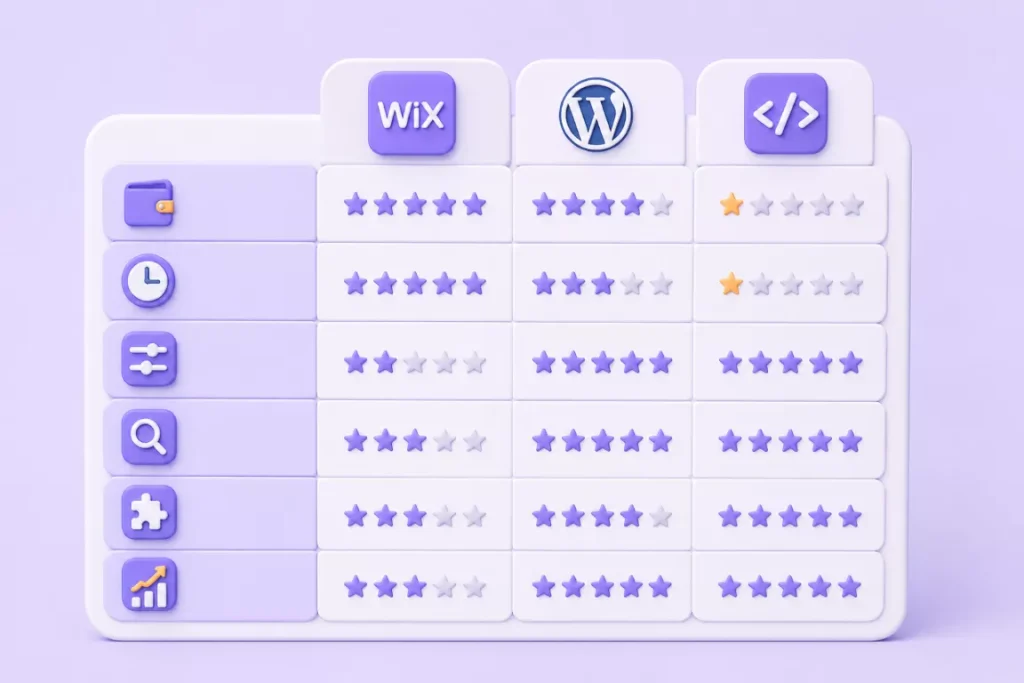
If you’re stuck on WordPress vs Wix, score each option out of 5 on these six factors. In WordPress vs Wix, this platform comparison matrix keeps the decision practical instead of emotional. Add your totals and you’ll usually see a clear winner.
Factors:
- Budget (build + monthly running)
- Time (how fast you need it live)
- Control (design, hosting, portability)
- SEO control (technical + content scale)
- Integrations (CRM, bookings, email, automations)
- Scalability (more pages, locations, staff)
Example scores (typical UK SME):
- Wix: Budget 5, Time 5, Control 2, SEO 3, Integrations 3, Scalability 3
- WordPress: Budget 4, Time 3, Control 5, SEO 5, Integrations 4, Scalability 5
- Custom: Budget 1, Time 1, Control 5, SEO 5, Integrations 5, Scalability 5
Now make it real with Manchester examples:
- Salon in Northern Quarter: Wix works if you use a solid booking app and keep services simple. WordPress wins if you want “balayage in Manchester” pages, stylist profiles, and heavy content.
- Restaurant in Ancoats: Wix can handle menus and basic reservations. WordPress is stronger if you want landing pages for events, seasonal menus, and Google visibility for “private dining”.
- Clinic in Salford: WordPress often fits better because you’ll want service pages, FAQs, and trust content. Custom only makes sense if you need complex patient flows.
- Trades in Didsbury: WordPress is usually the sweet spot for local lead-gen, service area pages, and tracking. Wix can work if you just need a clean brochure with click-to-call.
A good next step is to map your migration path. For example, start on Wix for speed, then move to WordPress once you’ve proven which services and pages actually convert. If you’re focused on local visibility, it’s also worth getting your Google profile right, because it drives calls even before your site ranks.
Frequently asked questions
Is WordPress or Wix better for SEO in the UK?
In WordPress vs Wix, WordPress usually gives SMEs more control and room to grow, especially for content and technical SEO. Wix can rank for local terms if your site is simple and well-structured, but you may hit limits as you add pages, locations, and more advanced SEO work.
Mobile behaviour is a big part of this. Ofcom’s recent reporting shows the UK is firmly mobile-first in how people browse and discover services (see Ofcom Online Nation). If your platform makes your site slow or clunky on mobile, your rankings and conversions both suffer.
How much does a small business website cost?
In the UK, a basic Wix site might cost £15 to £40 per month plus apps, and your own time. A properly supported WordPress site often lands in the low-to-mid four figures to build, then £30 to £200+ per month for hosting, updates, and help. Custom builds commonly start from several thousand pounds and go up quickly once you include discovery, design, and ongoing changes.
Can I move from Wix to WordPress later?
Yes, but plan for it. You can export some content, but you’ll usually rebuild templates and reapply SEO settings. To protect SEO, keep the same URL structure where possible and set 301 redirects for any changes. This is where people lose traffic, they redesign and change every URL at the same time.
Do I need custom for bookings?
Usually not. Both Wix and WordPress can handle bookings for salons and clinics using proven tools, as long as you keep the process simple and reduce friction. Where custom becomes sensible is when you need unusual rules (complex pricing logic, multiple appointment types with dependencies, or deep CRM workflows).
What legal pages does a UK website need?
At minimum: privacy policy and cookie policy. If you sell online, take deposits, or have bookings, add terms and refund or cancellation terms. If you run marketing pixels or analytics, set up consent properly. The ICO guidance is a good baseline, and your policies should match what your site actually does.
Choose and launch without regret
If you’re weighing WordPress vs Wix, don’t start with features. Start with your constraints: how fast you need to launch, how often you’ll update, whether local SEO will drive most of your leads, and how much control you’ll want in 12 months.
Most Manchester SMEs do best with a simple rule: pick Wix for speed and simplicity, choose WordPress for growth and control, and only go custom when your workflow demands it and you’ve got budget for ongoing changes. Want a second opinion on your WordPress vs Wix scores and a quick plan you can act on this week? Get in touch with us at Minutes Agency and we’ll review your setup and recommend the most sensible next step.

